
Spring Security 정복하기(2)
Spring Security 아키텍처
이번장에서는 서블릿 애플리케이션에서 스프링 시큐리티의 아키텍처에 대해서 살펴볼 것이다.
일단 스프링 시큐리티는 서블릿 필터를 기반으로 동작하기 때문에 필터에 대하여 먼저 알아보자.
서블릿 필터(Filter)
필터 흐름
HTTP 요청 -> WAS -> 필터 -> 서블릿 -> 컨트롤러
- 필터를 적용하면 필터가 호출된 다음 서블릿이 호출된다.
- 필터는 일반적으로 서블릿 진입 전 공통 관심사를 처리하는데 사용된다.
- 필터에서 적절하지 않은 요청은 서블릿에 들어가기 전에 처리하여 로그인 여부를 체크하는데 유용하다.
필터 체인
HTTP 요청 -> WAS -> 필터1 -> 필터2-> 서블릿 -> 컨트롤러
- 필터 체인은 필터 여러개를 체인처럼 연결한 것이라고 생각하면 된다.
- 즉, 여러개의 필터를 추가할 수 있다.
아래 그림과 공식문서의 내용을 통해 필터에 대해 이해하고 넘어가자.
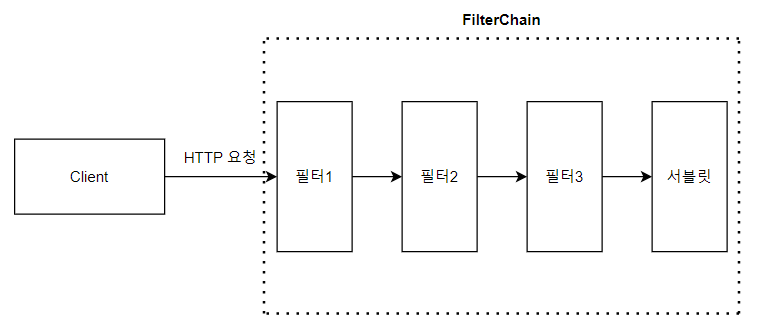
- 클라이언트가 요청을 보내면, 컨테이너는 요청 URI를 기반으로 해당
HttpServletRequest를 처리해야하는 필터 인스턴스와 서블릿을 포함하는FilterChain을 생성 - 단일
HttpServletRequest와HttpServletResponse를 처리할 수 있는 서블릿은 하나뿐이지만 여러개의 필터를 사용할 수 있음
public void doFilter(ServletRequest request, ServletResponse response, FilterChain chain) {
	// do something before the rest of the application
    chain.doFilter(request, response); // invoke the rest of the application
    // do something after the rest of the application
}
DelegatingFilterProxy
DelegatingFilterProxy는 필터 구현체로, 서블릿 컨테이너의 라이프사이클과 Spring의 ApplicationContext를 연결할 수 있게 한다.
- 서블릿 컨테이너는 자체 표준 필터를 등록할 수 있지만 스프링에서 정의된 Bean은 알지 못한다.
DelegatingFilterProxy를 표준 서블릿 컨테이너 메커니즘을 통해 등록하면 필터를 구현한 스프링 빈에 모든 작업을 위임할 수 있다.- 또한 스프링 빈으로 등록된 필터를 지연로드 한다.
필터 등록은 컨테이너가 시작되기 전에 필요한데 스프링은 보통
ContextLoaderListener를 이용해서 빈을 로드한다.
이 로드 시점의 차이를 DelegatingFilterProxy가 조정해준다.
아래 다이어그램은 DelegatingFilterProxy가 FilterChain내에서 어떻게 동작하는지 보여준다.
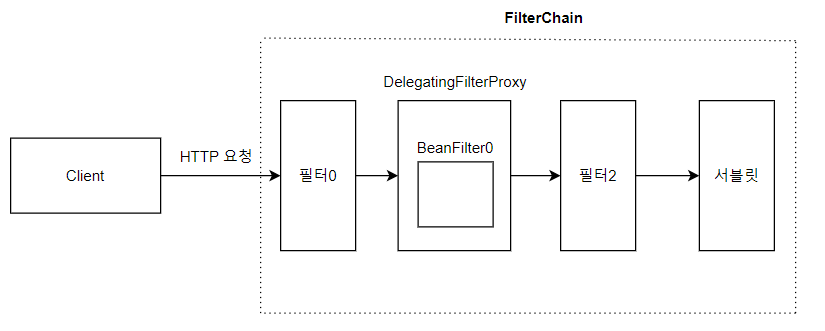
결론적으로 DelegatingFilterProxy 덕분에 스프링에서 정의한 필터를 필터 체인에 통합하여 처리할 수 있다는 내용인것 같다.
FilterChainProxy
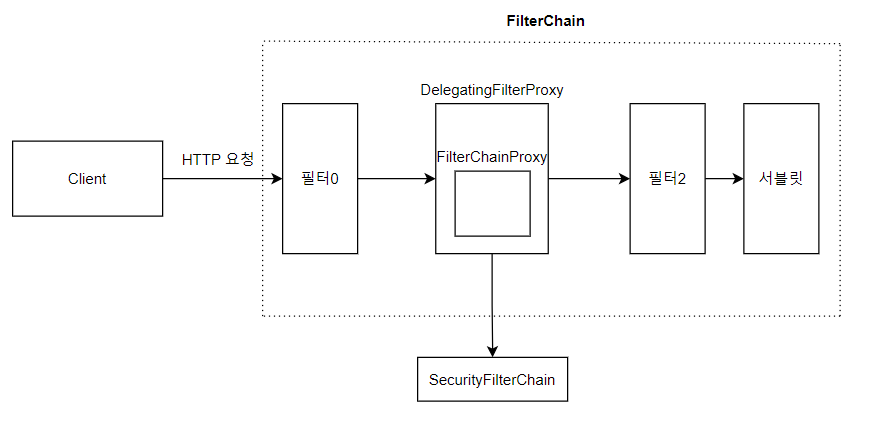
FilterChainProxy는 스프링 시큐리티에서 제공하는 특별한 필터로 SecurityFilterChain을 통해 여러 필터 인스턴스에 작업을 위임한다.
또한 FilterChainProxy 또한 필터 빈이기 때문에 DelegatingFilterProxy로 감싸져 사용된다.
SecurityFilterChain
SecurityFilterChain은 위 다이어그램에서 살펴본 것 처럼 FilterChainProxy에 의해 사용되며, 현재 요청에 대해 어떤 Spring Security 필터 인스턴스들이 호출되어야 하는지를 결정한다.
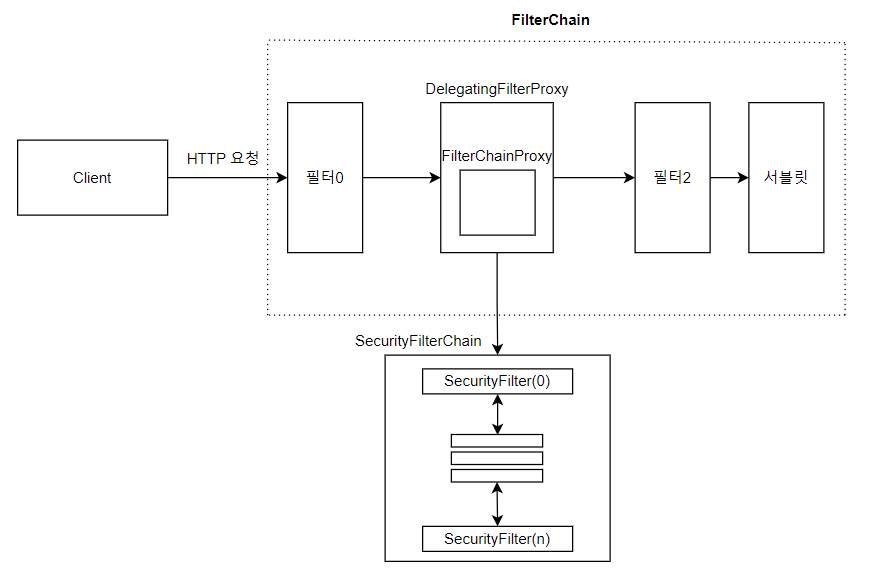
- Security Filter는 일반적으로 빈으로 등록되지만
DelegatingFilterProxy대신FilterChainProxy에 등록된다. 이 경우 장점이 존재한다.FilterChainProxy가 스프링 시큐리티의 시작점 역할이 된다. 따라서 디버깅 시FilterChainProxy부터 시작하면 된다.SecurityFilterChain이 언제 호출되어야 하는지를 결정할 수 있다.FilterChainProxy는RequestMatcher인터페이스를 제공하여 URL만으로 호출되는 서블릿 필터보다 유연성이 높다.
아래는 Muliple SecurityFilterChain 다이어그램이다.
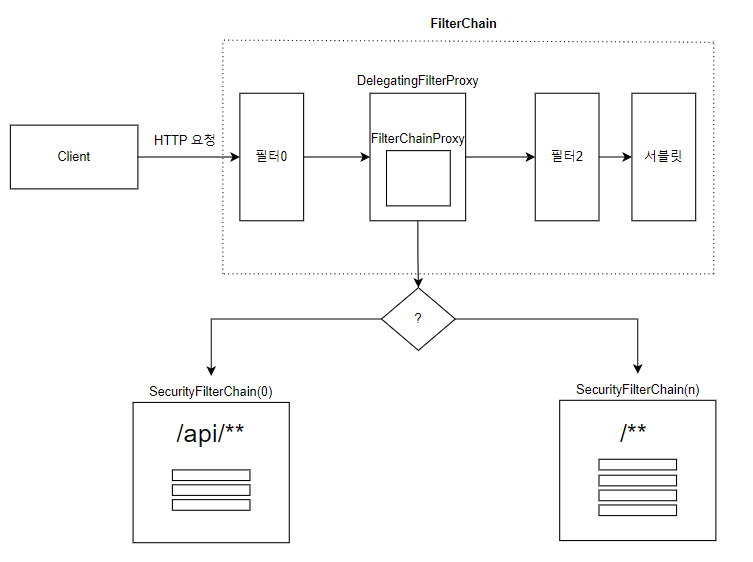
- 첫 번째로 매칭되는
SecurityFilterChain만 호출된다. - 만약 ‘/api/messages/’ 라는 URL로 요청되면, 비록
SecurityFilterChain(n)과도 일치하더라도 ‘/api/**‘과 먼저 매칭되기 때문에SecurityFilterChain(0)이 호출된다. - ‘/messages/’라는 URL로 요청이 온다면 ‘/api/** ‘ 요청과 일치하지 않으므로
FilterChainProxy는 다른SecurityFilterChain을 계속 시도하다가 결국 ‘/**‘과 매칭되는SecurityFilterChain(n)을 호출한다. - 각
SecurityFilterChain은 독립적으로 구성되어 보안 필터 인스턴스의 개수가 다를 수도 있다.
Security Filters
Security Filter는 앞서 살펴봤듯 SecurityFilterChain을 통해 FilterChainProxy에 등록된다.
이 필터들은 인증, 인가, 공격 방어등 다양한 목적으로 사용될 수 있다. 필터들은 특정한 순서로 실행되며 올바른 시점에 호출되도록 보장된다. 예를들어 인증 수행 필터는 인가를 수행하는 필터보다 먼저 호출된다.
(스프링 시큐리티의 구현에서 필터 호출 순서는 FilterOrderRegistration에서 확인할 수 있다.)
커스텀 필터 등록
앞의 과정을 잘 이해하였다면 커스텀 필터는 필터 클래스를 만들고 SecurityFilterChain에 등록하면 될것이란걸 유추할 수 있다.
공식문서에서 제공하는 샘플 코드를 보자.
public class TenantFilter implements Filter {

    @Override
    public void doFilter(ServletRequest servletRequest, ServletResponse servletResponse, FilterChain filterChain) throws IOException, ServletException {
        HttpServletRequest request = (HttpServletRequest) servletRequest;
        HttpServletResponse response = (HttpServletResponse) servletResponse;

        String tenantId = request.getHeader("X-Tenant-Id");
        boolean hasAccess = isUserAllowed(tenantId);
        if (hasAccess) {
            filterChain.doFilter(request, response);
            return;
        }
        throw new AccessDeniedException("Access denied");
    }

}
- 커스텀 필터는 필터 인터페이스를 구현하여
doFilter메소드에서 필터에서 수행할 작업을 정의해주면 된다.(스프링에서 필터작업과 동일하단 것을 이해할 수 있음) - TenantFilter에서는 단순히 헤더에 값을 꺼네어 그 값을 기준으로 필터체인을 진행할 것인지, 끝낼 것인지를 결정한다.
필터를 구현하는 대신 요청당 한 번만 호출되는 필터의 기본 클래스인
OncePerRequestFilter를 확장받고 HttpServletRequest 및 HttpServletResponse 매개변수와 함께 doFilterInternal 메소드를 제공할 수 있다.
이후 SecurityFilterChain에 필터를 추가해주면 된다.
@Bean
SecurityFilterChain filterChain(HttpSecurity http) throws Exception {
    http
        // ...
        .addFilterBefore(new TenantFilter(), AuthorizationFilter.class);
    return http.build();
}
addFilterBefore메소드에서 TenantFilter를 AuthorizationFilter 전에 추가하였다.addFilterAfter,AddFilterAt을 사용하여 필터를 원하는 부분에 추가할 수도 있다.- 이제 TenantFilter가 필터체인에서 호출되어 내부 필터작업이 호출될 것이다.
주의점
필터를 Spring Bean으로 선언할 때는 주의해야한다.
Spring Boot는 컴포넌트 스캔을 통해서 빈으로 선언된 필터를 자동으로 임베디드 서블릿 컨테이너에 등록한다. 이 경우 필터는 컨테이너에서 한번 실행되고, Spring Security Filter Chain에서도 한 번 더 실행될 수 있다.
만약 필터를 Bean으로 선언하되 자동으로 임베디드 컨테이너에 등록되지 않도록 하려면 FilterRegistrationBean을 사용할 수 있다.
FilterRegistrationBean의enabled속성을false로 설정하면, Spring Boot는 해당 필터를 컨테이너에 등록하지 않으므로 중복 호출을 방지할 수 있다.
@Bean
public FilterRegistrationBean<TenantFilter> tenantFilterRegistration(TenantFilter filter) {
    FilterRegistrationBean<TenantFilter> registration = new FilterRegistrationBean<>(filter);
    registration.setEnabled(false);
    return registration;
}
Security Exception 다루기
ExceptionTranslationFilter는 필터체인 내부에 등록되어 AccessDeniedException과 AuthenticationException을 HTTP 응답으로 변환할 수 있게 해준다.
아래 다이어그램을 보자.
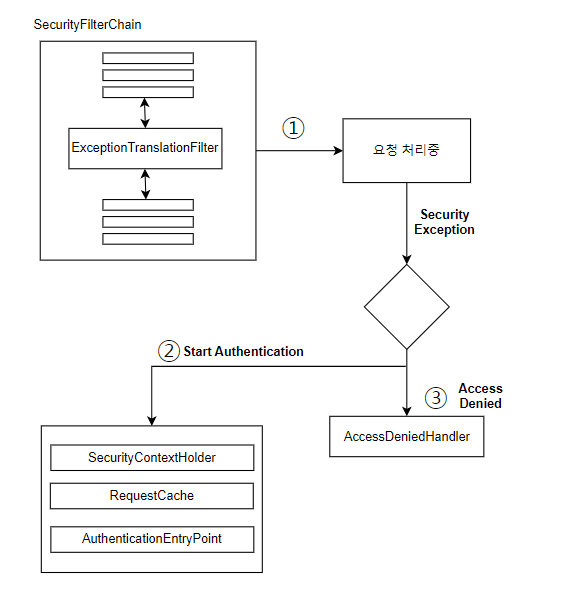
ExceptionTranslationFilter는FilterChain.doFilter(request, response)를 호출하여 나머지 부분 실행한다.- 사용자가 인증되지 않았거나
AuthenticationException이 발생한 경우, 인증을 시작한다.- SecurityContextHolder가 초기화된다.
- 원래 요청을 재실행할 수 있도록 HttpServletRequest가 저장된다.
- 클라이언트에게 자격 증명을 요청하기 위해
AuthenticationEntryPoint가 사용된다. 예를 들어, 로그인 페이지로 리다이렉션하거나 WWW-Authenticate 헤더를 보낼 수 있다.
아래는 공식문서에서 제공하는 ExceptionTranslationFilter 수도코드이다.
try {
	filterChain.doFilter(request, response);
} catch (AccessDeniedException | AuthenticationException ex) {
	if (!authenticated || ex instanceof AuthenticationException) {
		startAuthentication();
	} else {
		accessDenied();
	}
}
Appendix
RequestCache
예외를 처리하는 방법에서 설명한 것처럼, 인증이 필요하지만 인증되지 않은 상태로 리소스에 대한 요청이 있을 경우, 인증이 성공한 후에 해당 리소스를 다시 요청할 수 있도록 요청을 저장해야 한다. Spring Security에서는 HttpServletRequest를 RequestCache 구현체를 사용하여 저장함으로써 이 작업을 수행한다.
Logging
스프링 시큐리티는 보안 조치로 인해 요청이 거부된 이유에 대한 세부정보를 HTTP 응답 Body에 추가하지 않아서 디버깅이 어렵다.
설정파일에서 아래 옵션을 주어 로그메시지를 출력할 수 있다.
logging.level.org.springframework.security=TRACE
적용하기
위에 지금까지 학습한 내용을 정리해서 샘플 프로젝트를 만들어보려고 한다.
일단 인증과 인가에 대한내용은 아직 학습하지 않았으므로 지금까지 한 내용을 간추려보면
SecurityFilterChain을 통해 보안 작업이 수행되고 그 안에 우리가 원하는 필터도 추가할 수 있다는 내용이다.
먼저 Spring Web과 Spring Security Dependency만 추가하고 아래 코드를 짯다.
@Configuration
@EnableWebSecurity
public class SecurityConfig {

    @Bean
    public SecurityFilterChain filterChain(HttpSecurity httpSecurity) throws Exception{
        httpSecurity.
                csrf(Customizer.withDefaults())
                .authorizeHttpRequests(authorize -> {
                    authorize.anyRequest().permitAll();
                })
                .httpBasic(Customizer.withDefaults())
                .addFilterBefore(new HeaderFilter(), AuthorizationFilter.class);
        return httpSecurity.build();
    }
}

public class HeaderFilter extends OncePerRequestFilter {
    @Override
    protected void doFilterInternal(HttpServletRequest request, HttpServletResponse response, FilterChain filterChain) throws ServletException, IOException {
        String hello = request.getHeader("hello");
        boolean flag = isAllowed(hello);
        if(flag){
            filterChain.doFilter(request, response);
            return;
        }
        throw new AccessDeniedException("Access Denied");
    }

    private boolean isAllowed(String hello) {
        return hello.equals("hello");
    }
}
간단하게 헤더의 내용을 확인하는 필터를 만들고 이를 SecurityFilterChain에 추가하였다.
로깅 설정도 해주고 이후 Postman으로 테스트해보자.
로그 메시지 확인
일단 우리는 컨트롤러가 없으므로 404 not found 를 원한다.
hello 헤더가 없으면 NullPointerException이 발생하므로 우리가 원하는 결과가 아니다. hello 헤더를 추가하자.
- hello 헤더가 “hello”일때
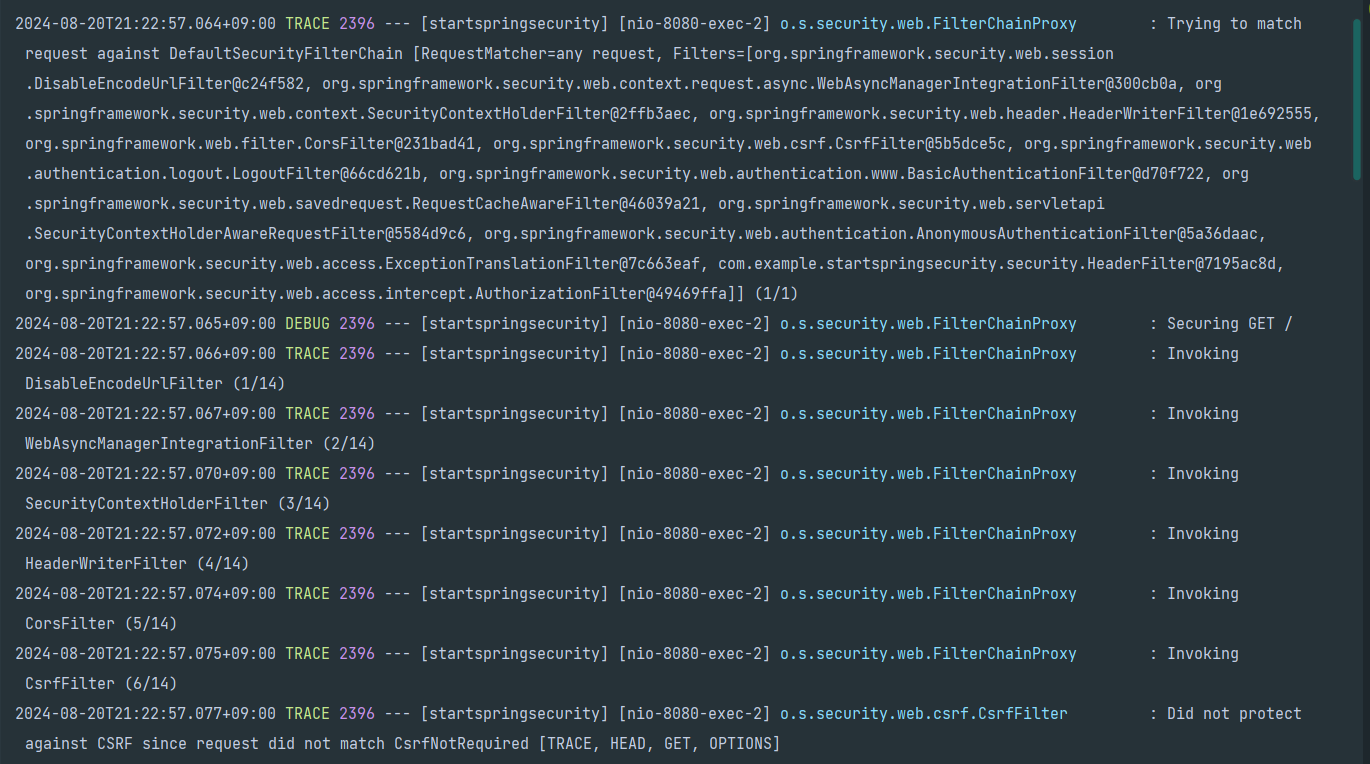
- 매칭될 필터체인 및 필터체인에 등록된 필터를 보여준다.
- 이후 요청 경로와 HTTP 메소드가 표시되며
- 나열된 필터 순서대로 필터에 접근하는걸 볼 수 있다.
이후 우리가 원하는 404 not found를 볼 수 있다.
- hello 헤더가 “hello”가 아닐때
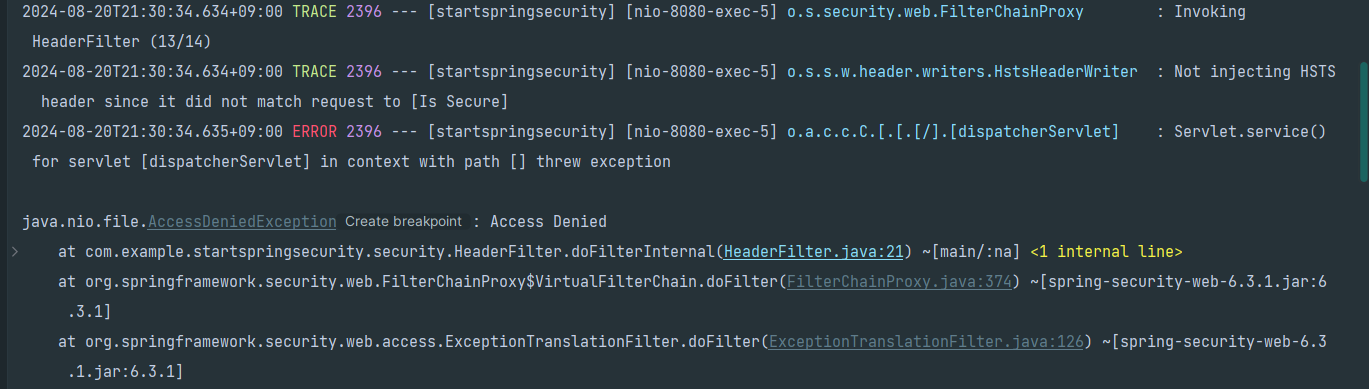
- 앞의 과정은 동일하다
- HeaderFilter 처리중 AccessDeniedException이 발생하였다.
- 이후 500 Internal Server Error가 발생하였다.
일단 예상하는대로 동작하는걸 확인했다.
그러나 우리는 예외를 다루는 방법을 위에서 확인하였다. AccessDeniedException이 발생하면 AccessDeniedHanlder로 예외가 전달된다는 것이다.
또한 스프링 시큐리티는 지금까지 살펴본 것 처럼 필터단에서 동작하지 않는가? 그러면 보통의 예외를 처리하는 방식인 ControllerAdvice에서 예외를 잡아 처리할 수 없다고 생각했다.
예외를 다룰땐 SecurityFilterChain 내부의 ExceptionTranslationFilter가 사용되는 것을 위 과정에서 확인했다. 따라서 SecurityFilterChain을 반환하는 메소드에서 handling 해주면 될 것이다.
코드를 수정해보자.
@Configuration
@EnableWebSecurity
public class SecurityConfig {
    @Bean
    public SecurityFilterChain filterChain(HttpSecurity httpSecurity) throws Exception{
        httpSecurity.
                csrf(Customizer.withDefaults())
                .authorizeHttpRequests(authorize -> {
                    authorize.anyRequest().permitAll();
                })
                .httpBasic(Customizer.withDefaults())
                .exceptionHandling( exceptionHandling -> { exceptionHandling
                        .accessDeniedHandler((request, response, accessDeniedException) -> System.out.println("Success Exception Control(AccessDeniedException)"))
                        .authenticationEntryPoint((request, response, authException) -> System.out.println("Success Exception Control(AuthenticationException)"));
                })
                .addFilterBefore(new HeaderFilter(), AuthorizationFilter.class);
        return httpSecurity.build();
    }
}
- exceptionHandling 코드가 추가되었다.
- 내부에서는
AccessDeniedException과AuthenticationException을 처리하는 두 코드가 작성되어있다. - 예외처리 로직에 따라
AccessDeniedHandler와AuthenticationEntryPoint의 구현체는 만들어서 넣어주면 될 듯.
실행 후 헤더값을 “hello1”로 잘못 입력하여 보내면 AccessDeniedException이 발생하고 이후 아래사진처럼 처리되는 것을 확인할 수 있다.

정리
지금까지 스프링 시큐리티의 기본적인 동작방식을 알아보았다. 서블릿 필터에서부터 시작하여 여기에 스프링 기술이 어떻게 적용되는지 살펴보고 프록시를 통해 보안필터 체인들이 쭉 적용되어 처리가 되는 것을 확인하였다. 또한 보안필터에 커스텀필터도 추가할 수 있고 그 과정에서 발생하는 Security Exception이 어떻게 처리되는지도 알아보았다.