
커스텀 정렬조건 만들기
코딩테스트 문제를 풀다보면 배열 혹은 컬렉션을 정렬해야하는 상황이 매우 많다.
직접 구현하자니 반복문 때문에 코드의 복잡성이 증가하고 가독성이 떨어졌다. 그럴때마다 자동적으로 Arrays.sort() 혹은 Collections.sort()를 사용하는 경우가 많았다.
하지만 정렬조건이 달라진다면 위와 같은 방법은 무용지물이 된다.
오늘은 자바에서 제공하는 sort 메서드에 대하여 살펴보고 배열과 컬렉션에 정렬조건을 지정하는 방법을 살펴보려고 한다.
Arrays.sort()
자바에 기본적으로 포함되는 java.base모듈에는 java.util패키지가 있고 이 패키지 내부에 Arrays라는 클래스가 존재한다.
클래스 이름과 맞게 배열과 관련된 다양한 메서드를 제공한다. 자바api 문서에서 제공하는 정렬관련 메서드의 종류를 살펴보자.
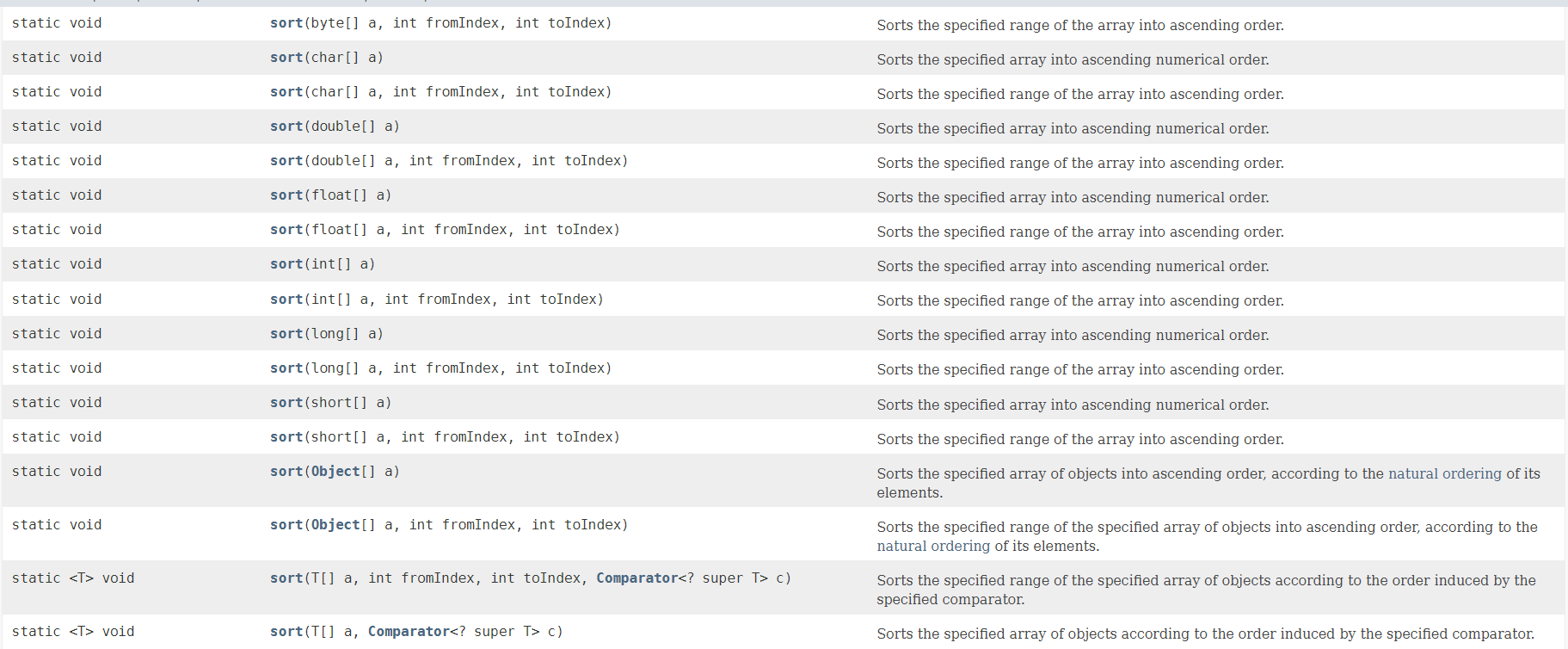
- 모든 기본타입 배열을 파라미터로 받도록 오버로딩 되어있다. 따라서 모든 기본타입 배열을
Arrays.sort()메서드에 제공할 수 있다. - 2, 3번째 파라미터로 시작인덱스, 끝 인덱스를 주어 정렬 범위를 설정할 수 있다.
- 기본적으로 모든 배열은
ascending order로 정렬을 수행한다. Comparator객체를 마지막 파라미터로 받는 sort의 경우 comparator에서 특정한 방식대로 정렬을 수행한다.
따라서 Comparator를 어떻게 구현하냐에 따라서 우리는 정렬방식을 자유자재로 설정할 수 있는 것이다.
Comparator를 알아보기 전에 sort메서드의 동작 방식부터 알아보자.
Arrays.sort() 동작방식
sort() 메서드는 기본타입과 참조타입에 대하여 서로 다른 알고리즘을 사용한다.
기본타입
/*
 * Sorting methods. Note that all public "sort" methods take the
 * same form: performing argument checks if necessary, and then
 * expanding arguments into those required for the internal
 * implementation methods residing in other package-private
 * classes (except for legacyMergeSort, included in this class).
 */

/**
 * Sorts the specified array into ascending numerical order.
 *
 * @implNote The sorting algorithm is a Dual-Pivot Quicksort
 * by Vladimir Yaroslavskiy, Jon Bentley, and Joshua Bloch. This algorithm
 * offers O(n log(n)) performance on all data sets, and is typically
 * faster than traditional (one-pivot) Quicksort implementations.
 *
 * @param a the array to be sorted
 */
public static void sort(int[] a) {
    DualPivotQuicksort.sort(a, 0, 0, a.length);
}
모든 기본타입 배열의 sort에서는 Dual-Pivot QuickSort알고리즘을 사용하여 정렬한다.
implNote에 따라 Dual-Pivot QuickSort는 O(n log(n))의 시간복잡도를 제공하며 one-pivot Quicksort에 비하여 더욱 빠르다고 한다.
퀵정렬같은 경우는 기본적으로 피벗을 정하여 피벗보다 값이 큰부분, 작은부분으로 나누어 재귀적으로 정렬을 수행한다.
그러나 Dual-Pivot QuickSort는 피벗을 두개를 가지며 피벗보다 작은부분, 피벗과 피벗의 사이부분, 피벗보다 큰 부분 3가지로 나뉘어 각 부분에서 정렬이 재귀적으로 수행된다.
만일 피벗을 잘못 정하게 될 경우에는 배열이 비효율적으로 분할되어 O(n^2)의 시간복잡도를 가지게 된다.
참조타입
참조타입 배열을 정렬할 때는 TimSort알고리즘을 사용한다.
/*
 * Sorts the specified array of objects into ascending order, according to
 * the natural ordering of its elements. The array must be mutually
 * comparable, i.e., for any pair of elements e1 and e2 in the array,
 * e1.compareTo(e2) must not throw a ClassCastException.
 *
 * @param a the array to be sorted
 */
public static void sort(Object[] a) {
    if (LegacyMergeSort.userRequested) {
        legacyMergeSort(a);
    } else {
        TimSort.sort(a);
    }
}
TimSort는 합병 정렬(Merge Sort)과 삽입 정렬(Insertion Sort)의 장점을 결합하여 설계된 알고리즘으로, 다음과 같은 특징을 가진다.
- stable: TimSort는 안정적이므로, 동일한 값을 가진 요소들의 순서는 정렬 후에도 유지된다.
- 부분적으로 정렬된 데이터에 최적화: 입력 배열이 이미 부분적으로 정렬된 경우, 성능이 크게 향상된다. 이미 거의 정렬된 데이터가 들어오면, TimSort는 그 데이터에서 적은 비교 횟수로 빠르게 정렬할 수 있다.
- 최악의 경우에도 O(n log n): 최악의 경우에도 O(n log n)의 시간 복잡도를 보장한다. 이는 기본적인 합병 정렬과 동일한 성능이다.
Comparator
위에서 말한대로 Comparator를 사용하여 커스텀 정렬조건을 지정할 수 있다.
@FunctionalInterface
public interface Comparator<T>{
    int compare(T o1, T o2);
}
- Comparator는 인터페이스로
compare()라는 추상메소드 하나만 가지는 FunctionalInterface이다. compare()메소드는 T타입의 두 객체를 비교하여 정렬조건을 설정한다.- 함수형 인터페이스이기 때문에 람다식으로도 작성할 수 있다.
예시 코드를 작성해보며 알아보자.
public class SortPractice {
    public static void main(String[] args) {
        Integer[] arr = new Integer[]{3,1,8,16,78};
        Arrays.sort(arr, new MyComparator());

        System.out.println(Arrays.toString(arr));
    }
    static class MyComparator implements Comparator<Integer>{
        @Override
        public int compare(Integer o1, Integer o2) {
            return o1-o2;
        }
    }
}

// 출력
[1, 3, 8, 16, 78]
- compare 메소드의 o1, o2로 배열의 두 요소씩 비교된다.
compare() 메서드의 반환값에 따른 결과
- o1 < o2(음수) : o1이 o2보다 작을 시 두 요소는 그대로 두고 다음 비교로 넘어간다. 즉, o1이 앞에 위치한다.
- o1 > o2(양수) : o1이 o2보다 클 시 두 요소의 위치를 교환한다. 즉, o1이 뒤로가고 o2가 앞으로 온다.
- o1 == o2 : 두 요소가 같을 시 두 요소의 순서는 그대로 유지된다.
따라서 compare 메소드를 적절히 정의하여 정렬 조건을 설정하면 된다.
내림차순
단순히 compare 메소드의 반환값을 수정해주면 된다.
static class MyComparator implements Comparator<Integer>{
    @Override
    public int compare(Integer o1, Integer o2) {
        return o2-o1;
    }
}

// 출력
[78, 16, 8, 3, 1]
Collections.sort()에 적용하기
public class SortPractice {
    public static void main(String[] args) {
        List<Integer> list = new ArrayList<>(Arrays.asList(1,8,17,81));
        Collections.sort(list, (o1, o2) -> o2-o1);
        System.out.println(list);
    }
}
// 출력
[81, 17, 8, 1]
- 마찬가지로
Collections.sort()메서드의 두번째 인자에 Comparator를 넘겨주면 된다. - 이번에는 람다식을 이용하여 Comparator를 구현하였다. 함수형 인터페이스이기 때문에 가능하다.
복잡한 정렬조건 설정하기
상황을 가정해보자. 만약 학생리스트가 있고 학생은 번호, 키, 나이 필드를 가진다고 생각해보자.
이때 학생을 나이를 기준으로 오름차순 정렬하되, 나이가 같으면 키를 기준으로 내림차순 정렬해보자.
public class SortPractice {
    public static void main(String[] args) {
        List<Student> list = new ArrayList<>();
        list.add(new Student(1, 173, 24));
        list.add(new Student(1, 191, 24));
        list.add(new Student(2, 181, 21));
        list.add(new Student(3, 158, 21));
        list.add(new Student(3, 168, 28));

        Collections.sort(list, new Comparator<Student>() {
            @Override
            public int compare(Student o1, Student o2) {
                if(o1.age==o2.age) return o2.height-o1.height;
                else return o1.age-o2.age;
            }
        });

        System.out.println(list);
    }
    static class Student{
        int number;
        int height;
        int age;

        public Student(int number, int height, int age) {
            this.number = number;
            this.height = height;
            this.age = age;
        }

        @Override
        public String toString() {
            return "Student{" +
                    "number=" + number +
                    ", height=" + height +
                    ", age=" + age +
                    '}';
        }
    }
}
// 출력
[Student{number=3, height=181, age=21}, Student{number=4, height=158, age=21}, Student{number=2, height=191, age=24}, Student{number=1, height=173, age=24}, Student{number=5, height=168, age=28}]
이처럼 Comparator의 구현을 변경하여 정렬조건을 설정할 수 있음을 알아보았다.